

Create SharePoint lists in minutes, not hours
Need a tracker, register or log but don’t want to build it from scratch?
Microsoft Copilot in SharePoint can help you create a SharePoint List in minutes using plain English. SharePoint Lists are a great way to track information such as project actions, support tickets, company assets, risks and issues, all in a structured and collaborative way.
How it Works
1.Open your SharePoint site and click the Copilot icon.
2. Select Create a list
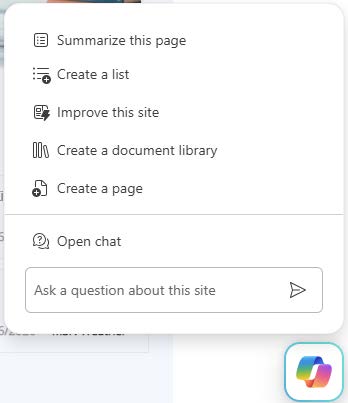
3. Choose one of the suggested list types or describe your own requirements.
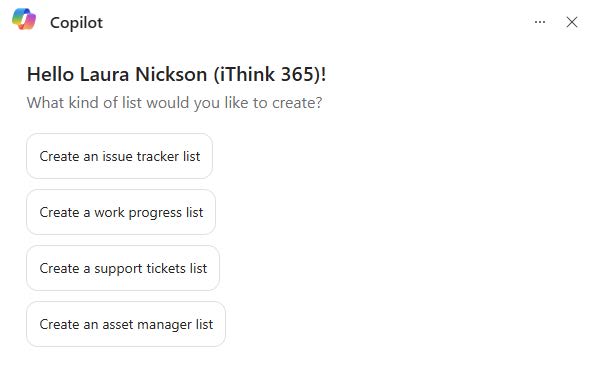
4. Review the structure Copilot creates and generate your list.
That’s it. No manually creating columns or setting up the list from scratch.
Taking it Further
A SharePoint List is often just the starting point. Once your information is stored in a structured way, you can build approvals, reminders, notifications and reporting using tools such as Power Automate, Power Apps and Microsoft Teams.
At iThink 365, we help organisations turn simple SharePoint Lists into practical business solutions that save time, improve visibility and reduce manual effort.
“What SharePoint List would you ask Copilot to create first?”
Want to Know How We Can Support Your Business?
Here at iThink 365 our expert team helps organisations unlock the full potential of Microsoft 365, leveraging AI, Copilot extensibility, and custom agents to build intelligent, automated solutions. From streamlining workflows to eliminating repetitive tasks, we deliver automation that saves time, boosts productivity, and adds real business value.